 NitroWarpNitroWarp
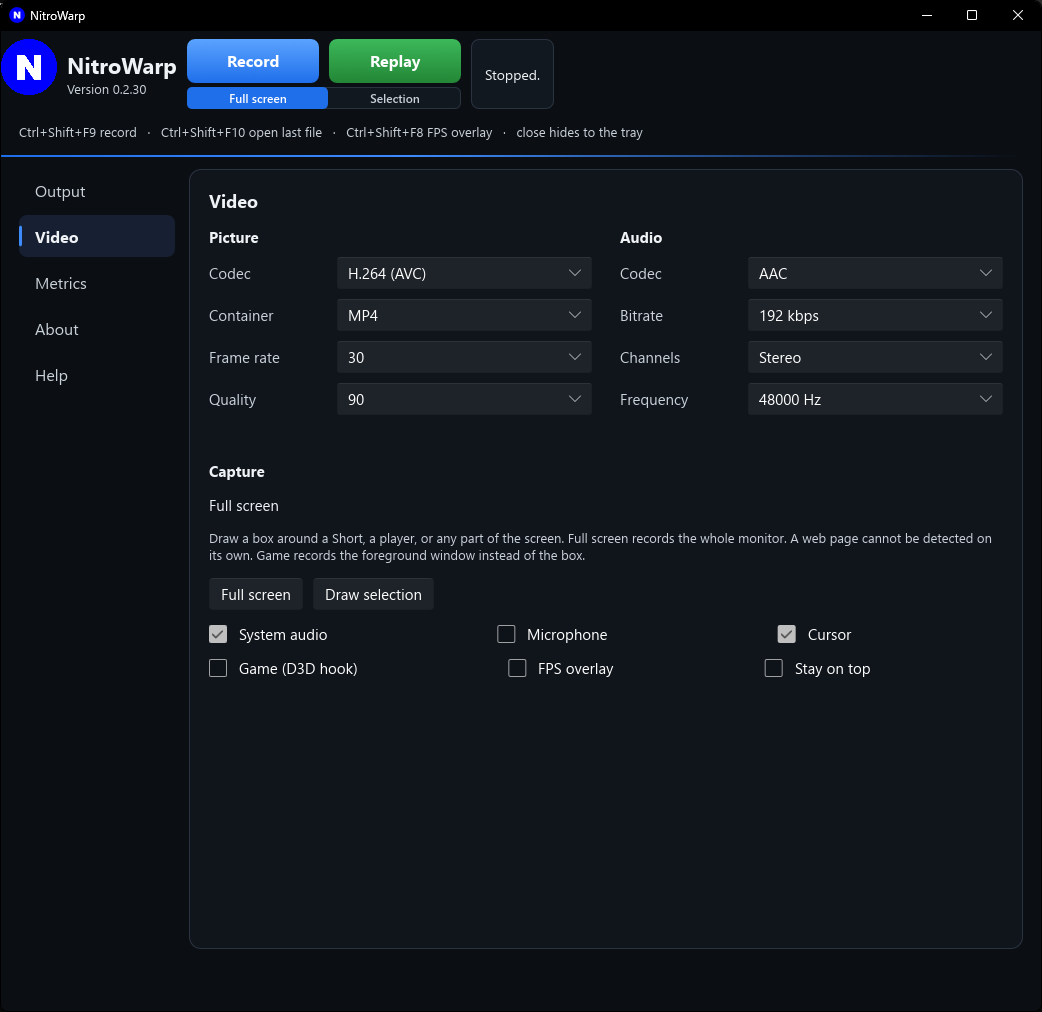
The small line under Record and Replay is the capture choice. The Video page shows the same choice in words, and has Full screen and Draw selection buttons.
 Open full size
Records the whole monitor. This is the starting choice. Use it when you want everything on the screen.
Records a rectangle you draw. Use it for a tall Short, a video player, or any part of the desktop.
While the drawing screen is up:
Draw selection on the Video page always opens the drawing screen, even when a box is already saved.
NitroWarp cannot find the video inside a web page by itself. A news stream or a Short is just pixels on the desktop. Draw the box around the picture you want.
Check Game (D3D hook) on the Video page when you are recording a game or another Direct3D program. NitroWarp then records the window in front, which is usually smoother than grabbing the whole desktop.
When Game is checked, it wins over a selection box. Leave it off for the desktop, a browser, and ordinary programs.
Includes the mouse pointer in the video. Leave it on when a viewer needs to follow the mouse. Turn it off for a cleaner picture, or for a game that already shows its own crosshair.
Shows a frames-per-second counter inside the game. It is drawn by the game hook. It is not a Windows overlay sitting on the desktop, so the desktop itself has nothing useful to show.
Ctrl+Shift+F8 turns the overlay on and off. The Video page checkbox does the same thing. Turn it off when you want a clean video.